Home Search Events Admin Dashboard User Guide

Passly Guide

Everything you need to know about buying tickets, promo campaigns, QR entry and managing events with Passly.

Buying Tickets Promo Campaigns Organizers

Buying Tickets


landing page

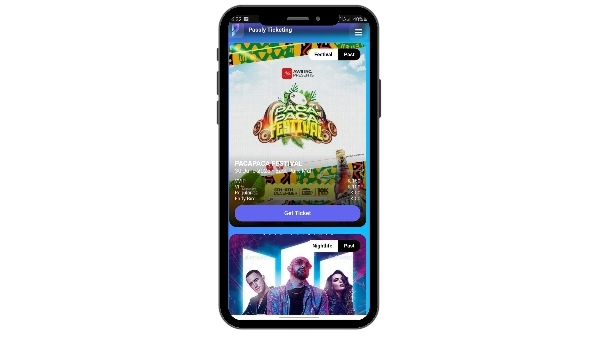
1. Browse Through Events

Explore available events, compare ticket types and choose the experience you want.


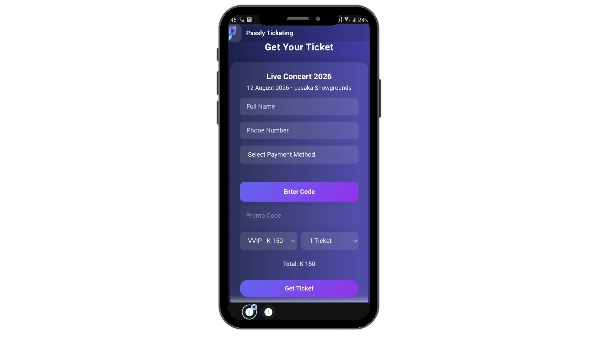
2. Select Your Ticket

Choose your ticket class, quantity, payment method and complete your details.

Note: Some events include exclusive promo campaigns before checkout.
landing page

landing page

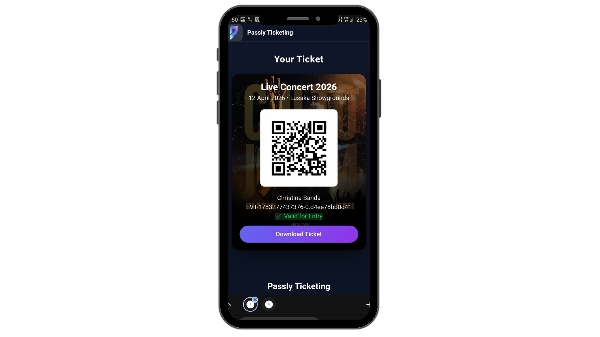
3. Download Your Ticket

Your PDF contains a secure QR code, ticket class and event information.

4. Exclusive Experiences

  • Behind-the-scenes access
  • Meet & greet opportunities
  • Merchandise giveaways
  • Brand partner prizes
  • VIP campaign rewards
landing page

Frequently Asked Questions

Can I transfer my ticket? Transfers depend on the organizer's policy.
Can I use more than one promo code? Currently only one promo code can be attached to a purchase.
What happens if my QR has already been scanned? Each QR can only be successfully validated once.
What if I lose my ticket? Contact the event organizer for assistance before the event.

Need Help?

Support

Need assistance with your purchase or event?

Create an Event

Launch your own event and start selling tickets with Passly.

Explore Events

Return to the homepage and discover upcoming experiences.